> For the complete documentation index, see [llms.txt](https://docs.rapidproxy.io/llms.txt). Markdown versions of documentation pages are available by appending `.md` to page URLs; this page is available as [Markdown](https://docs.rapidproxy.io/simplified-mandarin/dai-li/ji-cheng-zhi-nan/dong-tai-zhu-zhai-dai-li/undetectable.md).
# Undetectable
### **步骤 1:登录无痕浏览器**
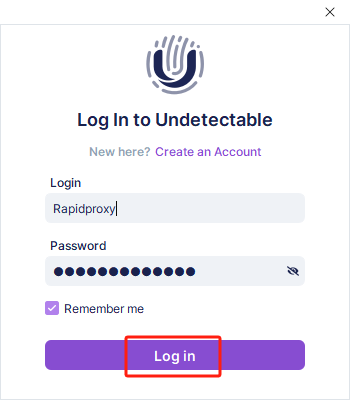
打开无痕浏览器,点击 **【**[**Log in**](https://undetectable.io/?utm_source=rapidproxy\&utm_medium=affiliate)**/登录】** 以访问你的账户。
 ### **步骤 2:创建一个新的浏览器环境**
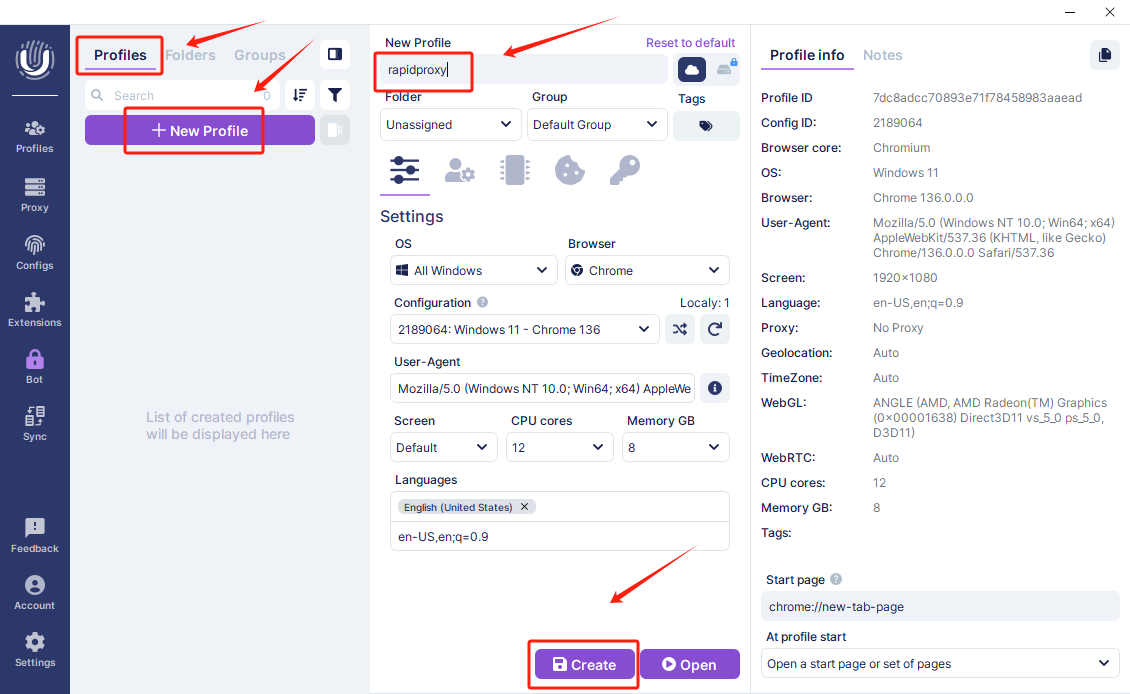
1. 前往顶部菜单,进入 **【Profiles/配置文件】**。
2. 点击 **【+New Profiles/+ 新建配置文件】**。
3. 为你的浏览器配置文件输入一个名称(例如:rapidproxy)。
4. 点击 **【Create/创建】**完成设置。
### **步骤 2:创建一个新的浏览器环境**
1. 前往顶部菜单,进入 **【Profiles/配置文件】**。
2. 点击 **【+New Profiles/+ 新建配置文件】**。
3. 为你的浏览器配置文件输入一个名称(例如:rapidproxy)。
4. 点击 **【Create/创建】**完成设置。
 ### **步骤 3:输入代理信息**
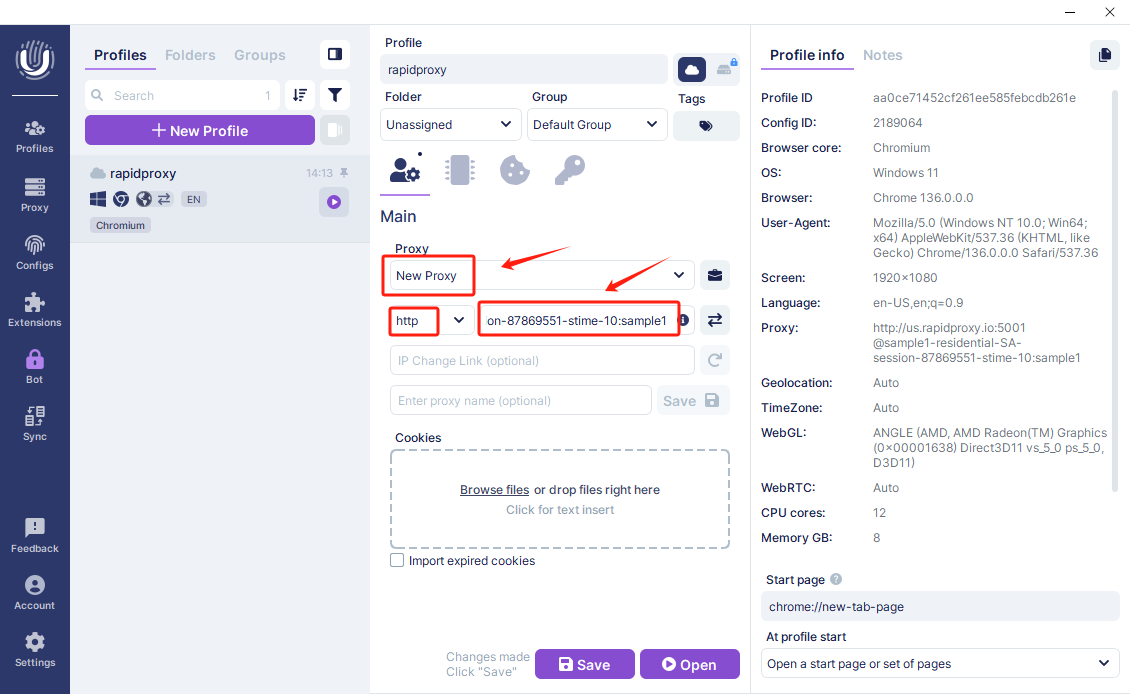
* 在配置文件的代理部分,选择**【New Proxy/新代理】**。
* 协议:选择**【HTTP】**作为代理类型。
(注意:RapidProxy 支持 HTTP、HTTPS & SOCKS5 协议。)
* 将从你的 RapidProxy 账户获取的代理详情(IP 地址、端口、用户名和密码)粘贴到无痕浏览器的相应字段中。
[如何通过 API 获取住宅代理?](/simplified-mandarin/dai-li/dong-tai-zhu-zhai-dai-li/huo-qu-dai-li/api/tong-guo-api-fang-shi-huo-qu-dai-li.md)
[如何通过用户名和密码认证获取住宅代理?](/simplified-mandarin/dai-li/dong-tai-zhu-zhai-dai-li/huo-qu-dai-li/yong-hu-ming-he-mi-ma-ren-zheng/pei-zhi-zhu-zhai-dai-li.md)
### **步骤 3:输入代理信息**
* 在配置文件的代理部分,选择**【New Proxy/新代理】**。
* 协议:选择**【HTTP】**作为代理类型。
(注意:RapidProxy 支持 HTTP、HTTPS & SOCKS5 协议。)
* 将从你的 RapidProxy 账户获取的代理详情(IP 地址、端口、用户名和密码)粘贴到无痕浏览器的相应字段中。
[如何通过 API 获取住宅代理?](/simplified-mandarin/dai-li/dong-tai-zhu-zhai-dai-li/huo-qu-dai-li/api/tong-guo-api-fang-shi-huo-qu-dai-li.md)
[如何通过用户名和密码认证获取住宅代理?](/simplified-mandarin/dai-li/dong-tai-zhu-zhai-dai-li/huo-qu-dai-li/yong-hu-ming-he-mi-ma-ren-zheng/pei-zhi-zhu-zhai-dai-li.md)
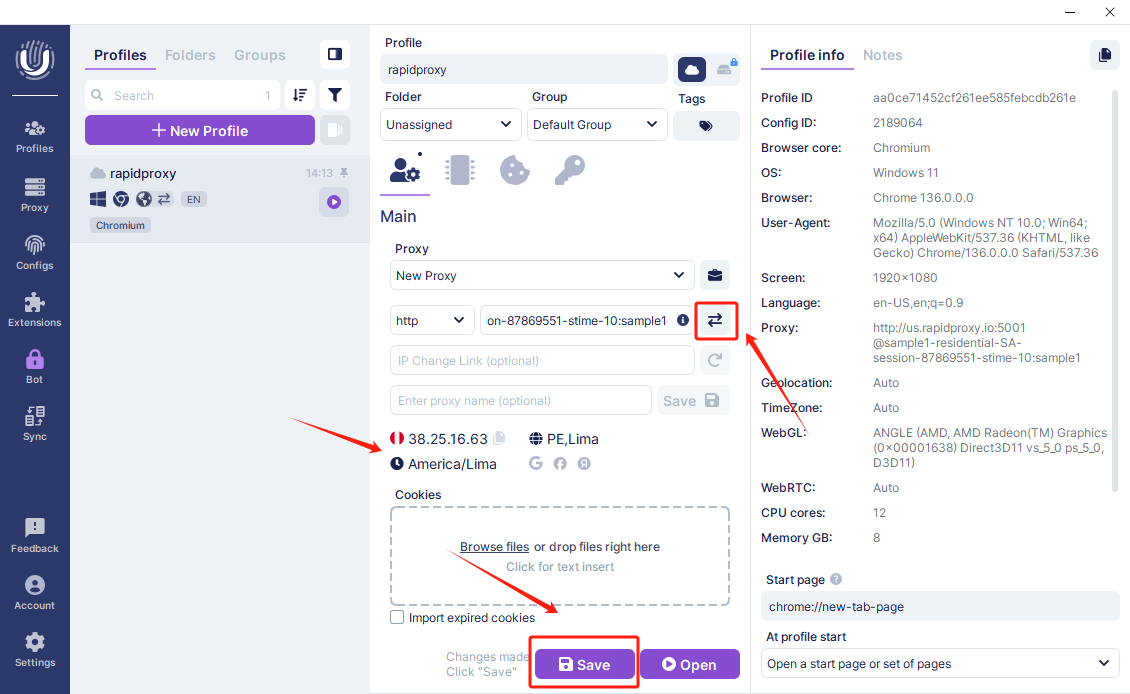
 ### **步骤 4:检查并保存代理配置**
* 点击 **【Check/检查】** 以测试代理是否正常工作。
* 如果连接成功,将会显示代理详情。
* 点击 **【Save/保存】** 以保存配置。
### **步骤 4:检查并保存代理配置**
* 点击 **【Check/检查】** 以测试代理是否正常工作。
* 如果连接成功,将会显示代理详情。
* 点击 **【Save/保存】** 以保存配置。
 ### **步骤 5:启动代理环境**
* 返回 **【Profiles/配置文件】** 页面。
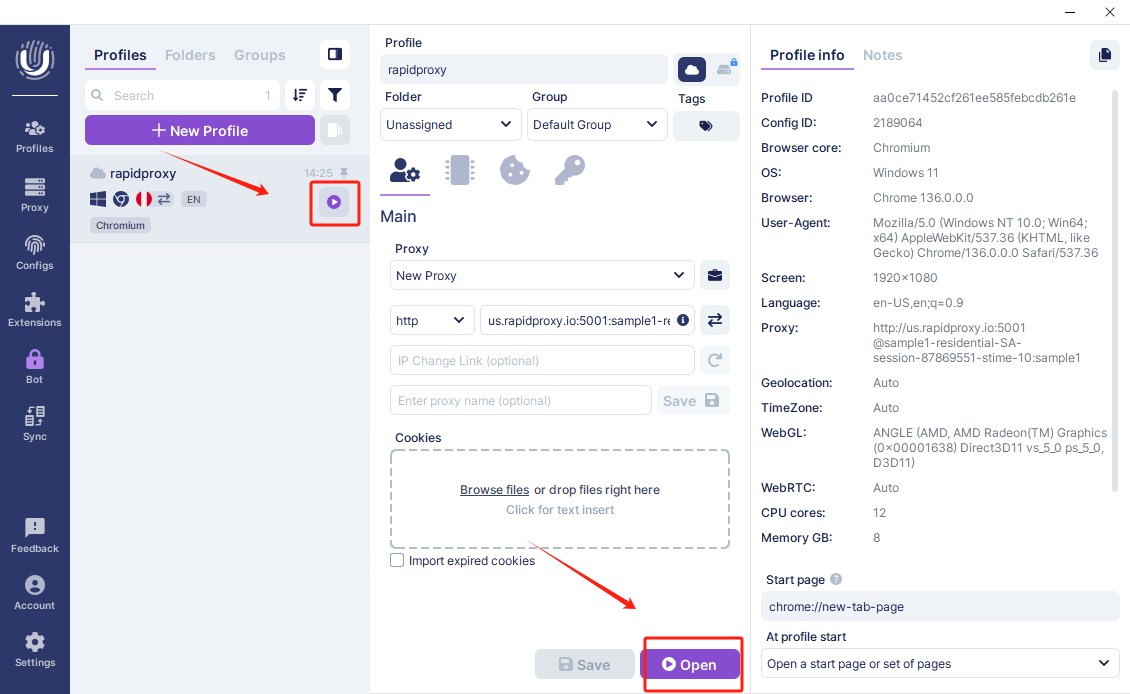
* 点击 **【Open/打开】** 按钮或启动图标,激活新创建的代理配置文件。
### **步骤 5:启动代理环境**
* 返回 **【Profiles/配置文件】** 页面。
* 点击 **【Open/打开】** 按钮或启动图标,激活新创建的代理配置文件。