> For the complete documentation index, see [llms.txt](https://docs.rapidproxy.io/llms.txt). Markdown versions of documentation pages are available by appending `.md` to page URLs; this page is available as [Markdown](https://docs.rapidproxy.io/simplified-mandarin/dai-li/ji-cheng-zhi-nan/dong-tai-zhu-zhai-dai-li/nstbrowser.md).
# NstBrowser
### **步骤 1:登录**
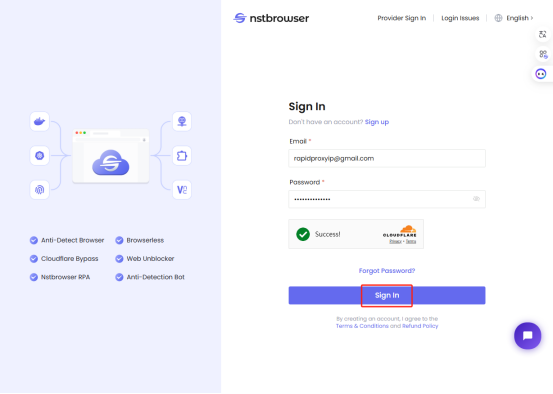
打开 NstBrowser浏览器,点击 **【Sign in/登录】** 以登录您的账户。
 ### **步骤 2:创建配置文件**
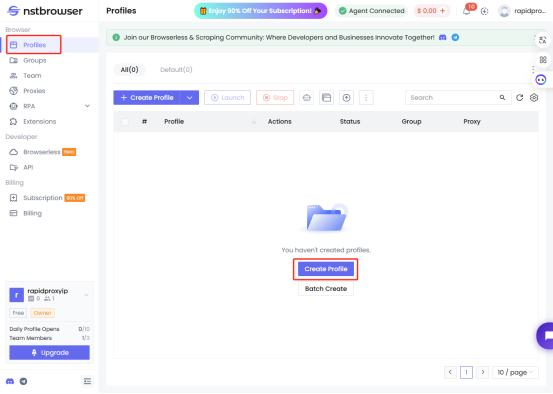
点击 **【Profile/配置文件】** 并选择 **【Create Profile/创建个人资料】** 。
### **步骤 2:创建配置文件**
点击 **【Profile/配置文件】** 并选择 **【Create Profile/创建个人资料】** 。
 ### **步骤 3:设置代理**
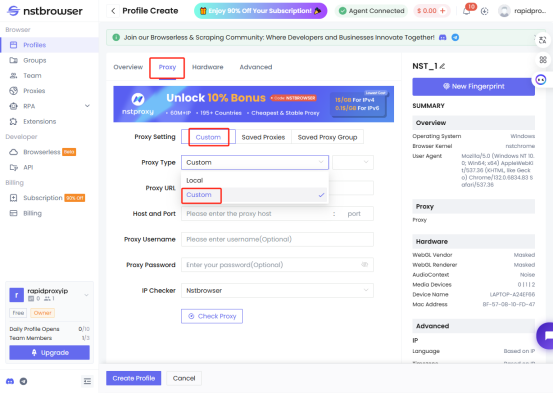
点击 **【Proxy/代理】**,然后选择 **【Custom/自定义】>【Custom/自定义】** 。
### **步骤 3:设置代理**
点击 **【Proxy/代理】**,然后选择 **【Custom/自定义】>【Custom/自定义】** 。
 ### **步骤 4:配置代理信息**
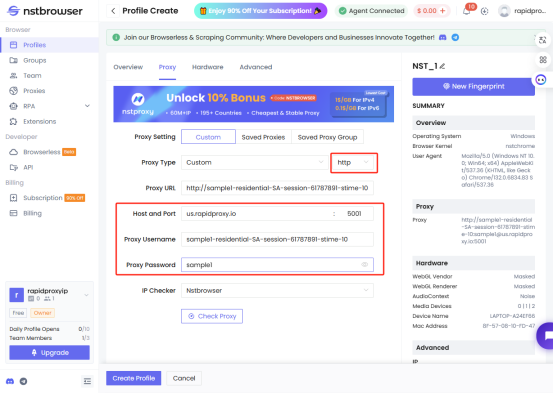
* 找到 **【Proxy Type/代理类型】** 并选择 HTTP。
* 将从 Rapidproxy 生成的代理信息粘贴到 NstBrowser 的相应字段中。
**代理类型**:本示例使用 HTTP。Rapidproxy 支持 HTTP、HTTPS & SOCKS5 协议类型。
[如何通过 API 获取住宅代理?](/simplified-mandarin/dai-li/dong-tai-zhu-zhai-dai-li/huo-qu-dai-li/api/tong-guo-api-fang-shi-huo-qu-dai-li.md)
[如何通过用户名和密码认证获取住宅代理?](/simplified-mandarin/dai-li/dong-tai-zhu-zhai-dai-li/huo-qu-dai-li/yong-hu-ming-he-mi-ma-ren-zheng/pei-zhi-zhu-zhai-dai-li.md)
### **步骤 4:配置代理信息**
* 找到 **【Proxy Type/代理类型】** 并选择 HTTP。
* 将从 Rapidproxy 生成的代理信息粘贴到 NstBrowser 的相应字段中。
**代理类型**:本示例使用 HTTP。Rapidproxy 支持 HTTP、HTTPS & SOCKS5 协议类型。
[如何通过 API 获取住宅代理?](/simplified-mandarin/dai-li/dong-tai-zhu-zhai-dai-li/huo-qu-dai-li/api/tong-guo-api-fang-shi-huo-qu-dai-li.md)
[如何通过用户名和密码认证获取住宅代理?](/simplified-mandarin/dai-li/dong-tai-zhu-zhai-dai-li/huo-qu-dai-li/yong-hu-ming-he-mi-ma-ren-zheng/pei-zhi-zhu-zhai-dai-li.md)
 ### **步骤 5:检查代理连接**
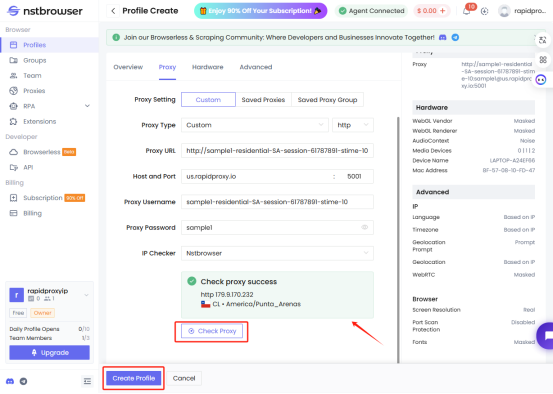
配置完成后,点击 **【Check Proxy/检查代理】** 以验证代理连接是否正常工作。
如果一切正常,您将看到 “Check proxy success!/检查代理成功!”的消息。
点击 **【Create Profile/创建配置文件】** 以保存代理配置。
### **步骤 5:检查代理连接**
配置完成后,点击 **【Check Proxy/检查代理】** 以验证代理连接是否正常工作。
如果一切正常,您将看到 “Check proxy success!/检查代理成功!”的消息。
点击 **【Create Profile/创建配置文件】** 以保存代理配置。
 ### **步骤 6:开始使用代理**
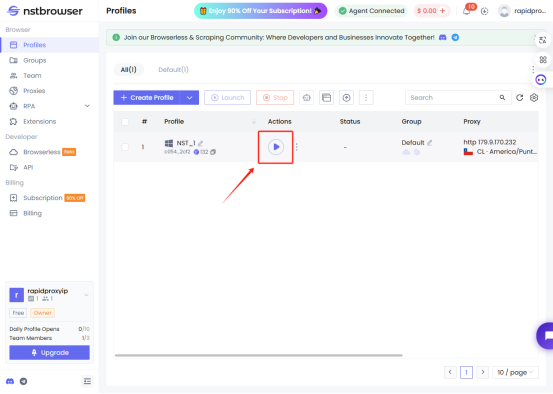
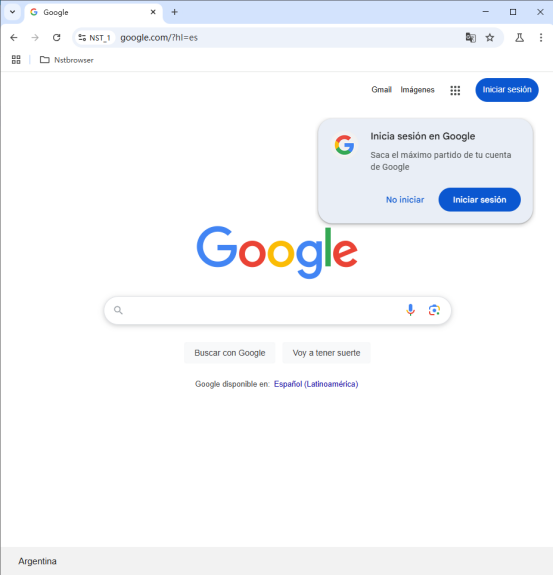
点击 **【Start button/开始按钮】** 以开始使用配置好的代理。现在,您就可以安全地进行在线活动了。
### **步骤 6:开始使用代理**
点击 **【Start button/开始按钮】** 以开始使用配置好的代理。现在,您就可以安全地进行在线活动了。