> For the complete documentation index, see [llms.txt](https://docs.rapidproxy.io/llms.txt). Markdown versions of documentation pages are available by appending `.md` to page URLs; this page is available as [Markdown](https://docs.rapidproxy.io/proxies/dynamic-residential-proxy/get-proxy/user-and-pass-auth/configuring-residential-proxies.md).
# Configuring Residential Proxies
Learn how to configure Rapidproxy dynamic residential proxies using username and password authentication. Set proxy locations, protocols, session types, and generate ready-to-use proxy credentials for
This guide explains how to configure and use **Rapidproxy Dynamic Residential Proxies** with **username and password authentication** after the recent dashboard update.
By following the steps below, you will be able to select proxy locations, session behavior, and generate ready-to-use proxy credentials for your applications or proxy tools.
***
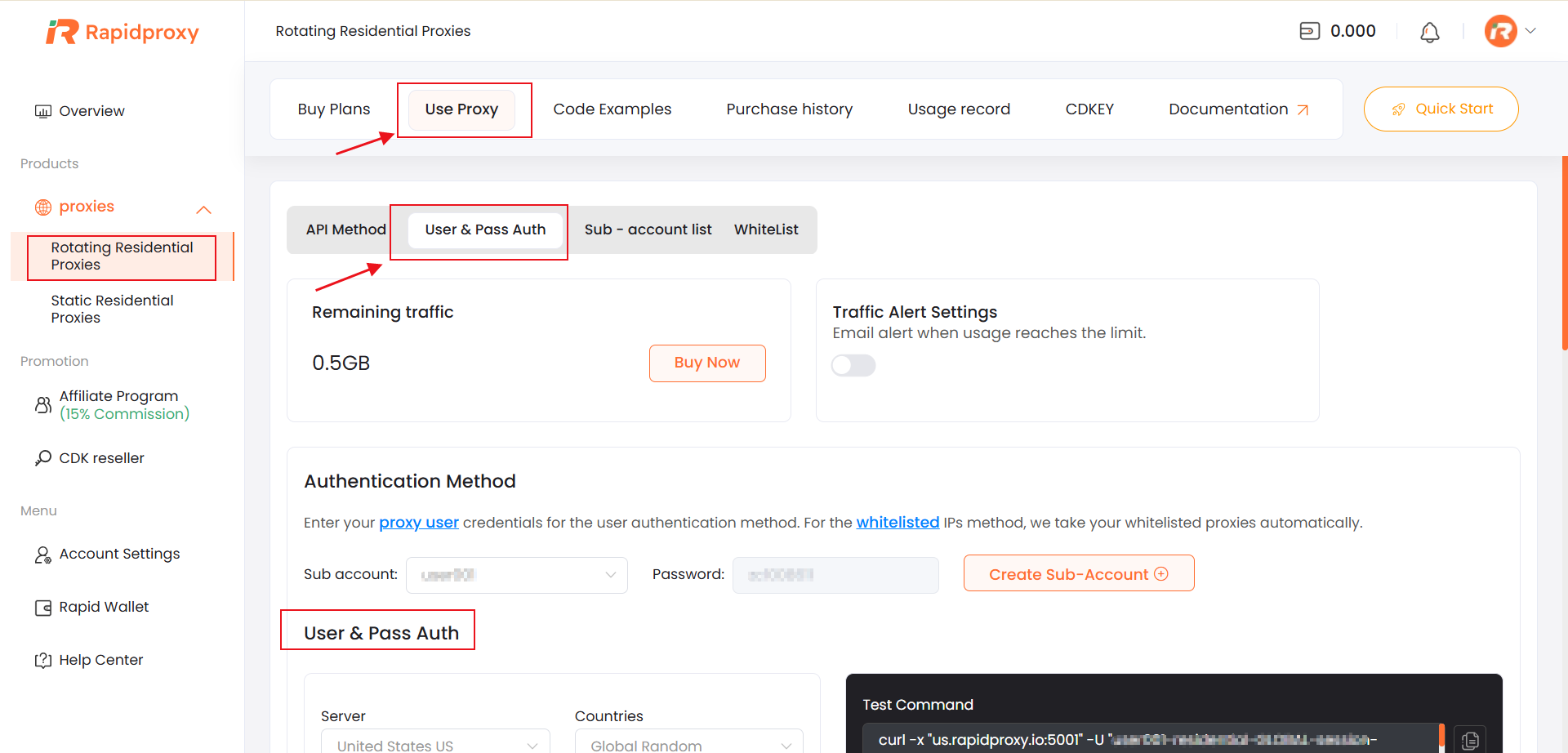
### Access the User & Pass Auth Configuration Page
1. Log in to your **Rapidproxy User Center (ucenter)**.
2. Navigate to:
```
Proxies → Rotating Residential Proxies → Use Proxy → User & Pass Auth
```
This section allows you to configure residential proxy parameters and generate proxy credentials based on [sub-accounts](https://docs.rapidproxy.io/proxies/dynamic-residential-proxy/get-proxy/user-and-pass-auth/creating-sub-account).
***
### Configure Proxy Location
On the configuration page, select your desired proxy location options:
* **Server**\
Choose the proxy server node.
* **Countries**\
Select the target country for your residential IPs.
* **State / Province (Optional)**\
Narrow down IP locations to a specific state or province.
* **City (Optional)**\
Further refine the IP location at the city level.
> 💡 Selecting more specific locations may reduce the available IP pool. If you need higher rotation diversity, we recommend selecting only the country level.
***
### Select Proxy Protocol
Choose the protocol you want to use:
* **HTTP**
* **HTTPS**
* **SOCKS5**
Make sure the selected protocol matches the requirements of your proxy software or application.
***
### Configure Session Settings
Rapidproxy supports flexible session control for different use cases:
* **Rotating IP**
* The IP address changes automatically on each request or at short intervals.
* Recommended for web scraping, price monitoring, and large-scale data collection.
* **Sticky IP**
* The same IP is maintained for a configurable session duration.
* Suitable for account login, form submissions, and session-sensitive tasks.
Select the option that best fits your workflow.
***
### Generate and Copy Proxy Credentials
Once all settings are configured:
1. Review your selected parameters.
2. Copy the **proxy information generated by Rapidproxy**, including:
* Proxy host
* Port
* Username
* Password
These credentials are generated automatically based on your configuration.
***
### Use the Proxy in Your Application or Tool
Paste the generated proxy credentials into your preferred proxy software, browser extension, automation tool, or script.
Rapidproxy residential proxies are compatible with most tools that support **username and password authentication**.
***
### Notes & Best Practices
* Ensure the sub-account you are using is **active** and has sufficient traffic available.
* If authentication fails, double-check the username, password, and selected protocol.
* For better stability, use **Sticky IP** when maintaining sessions is required.