> For the complete documentation index, see [llms.txt](https://docs.rapidproxy.io/llms.txt). Markdown versions of documentation pages are available by appending `.md` to page URLs; this page is available as [Markdown](https://docs.rapidproxy.io/proxies/dynamic-residential-proxy/get-proxy/api/ip-whitelisting.md).
# IP Whitelisting
Learn how to configure IP whitelisting for Rapidproxy dynamic residential proxies, including adding your current IP with one click from the dashboard.
This guide explains how to configure **IP whitelisting** for Dynamic (Rotating) Residential Proxies in Rapidproxy.\
IP whitelisting allows you to authenticate proxy access by approving specific IP addresses instead of using username and password authentication.
***
### What Is IP Whitelisting?
IP whitelisting is an authentication method that allows only approved IP addresses to access your proxy resources.
When IP whitelisting is enabled:
* Requests coming **from whitelisted IPs** are allowed
* Requests from **non-whitelisted IPs** are rejected
* No username or password is required for authentication
This method is commonly used for **servers, cloud instances, and API-based integrations** with fixed outbound IPs.
***
### How to Configure IP Whitelisting
Follow the steps below to add your IP address to the whitelist.
#### Step 1: Log in to the User Center
1. [Log in to your Rapidproxy account](#how-to-configure-ip-whitelisting).
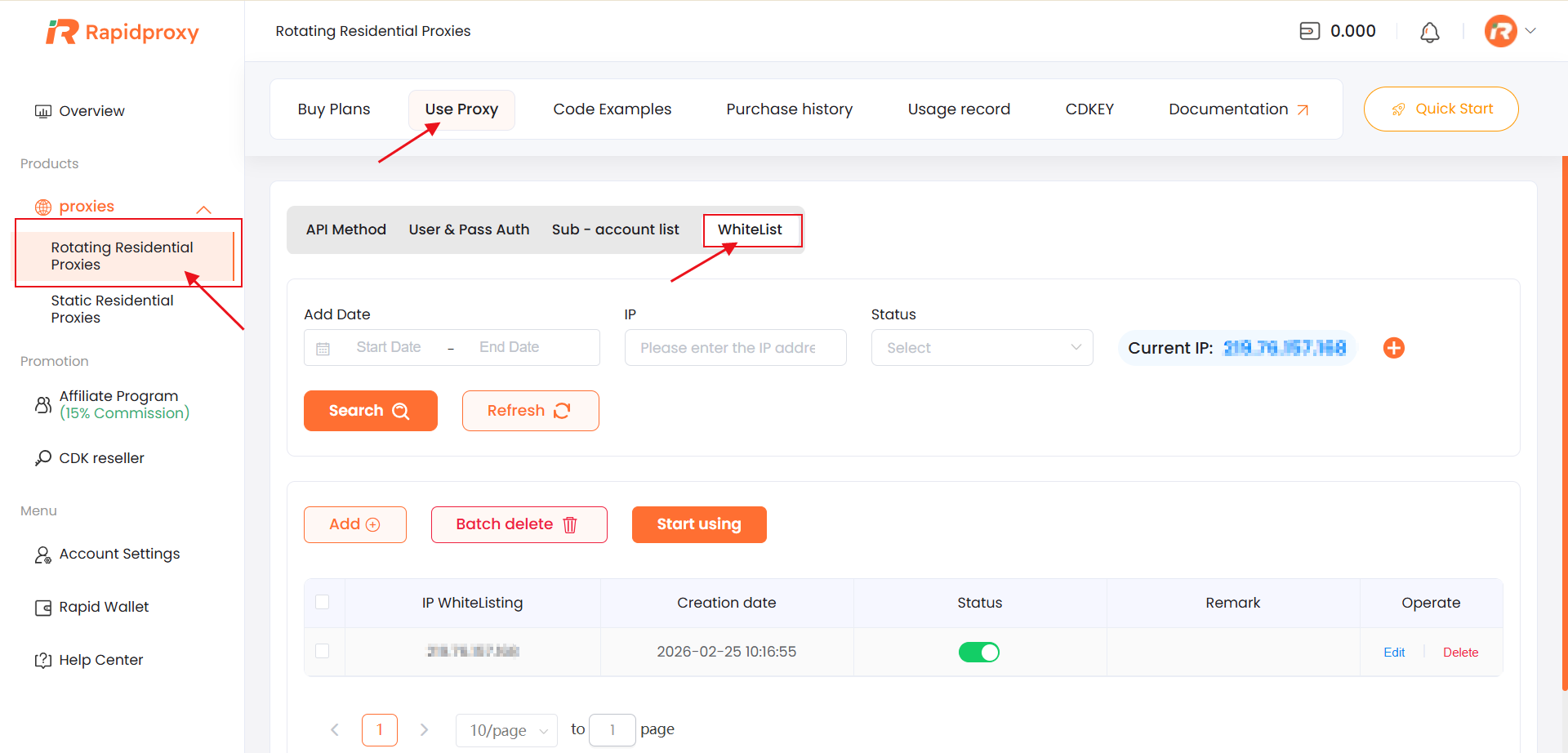
2. Enter the **User Center (UCenter)** dashboard.
***
#### Step 2: Navigate to Rotating Residential Proxies
From the dashboard menu:
1. Go to **Rotating Residential Proxies**
2. Click **Use Proxy**
This section contains configuration options for dynamic residential proxy usage.
***
#### Step 3: Open the Whitelist Settings
Inside the **Use Proxy** page:
1. Locate the **WhiteList** section
2. You will see a list of currently whitelisted IP addresses (if any)
***
#### Step 4: Add Your Current IP Address
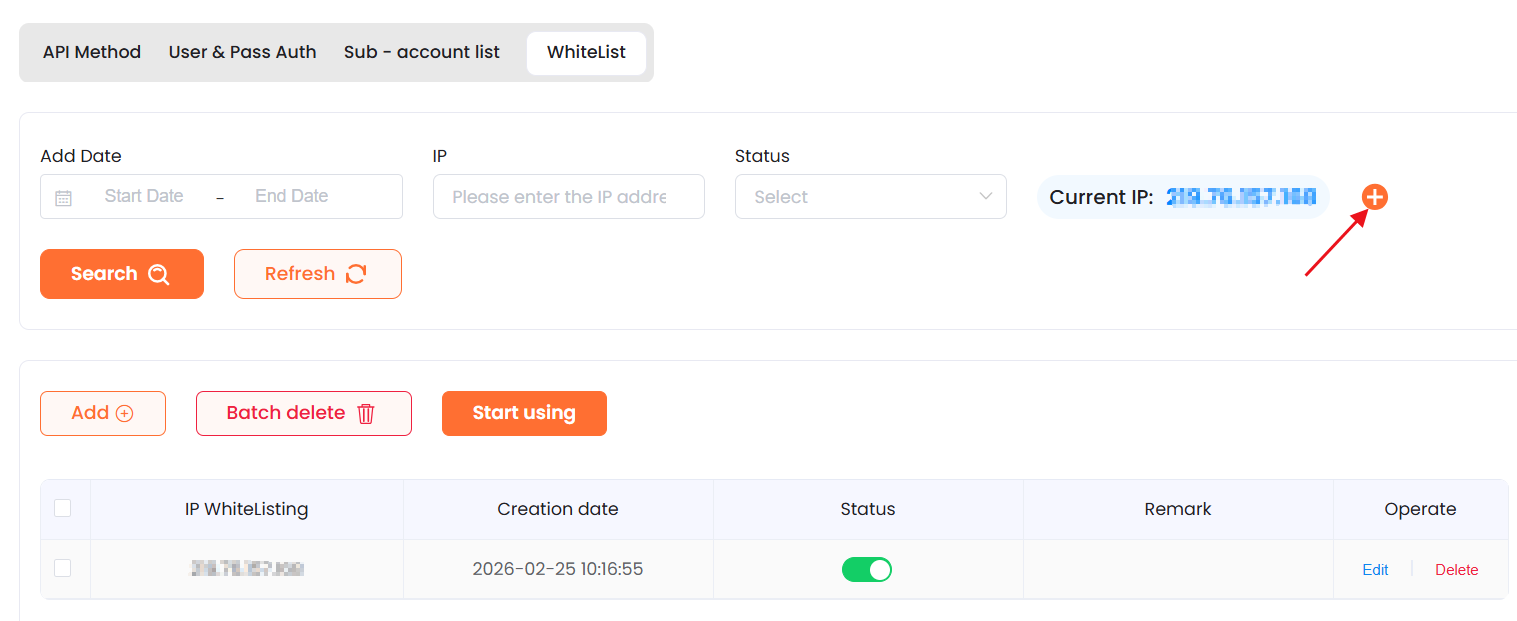
Rapidproxy automatically detects your **current public IP address**.
To add it to the whitelist:
1. Find your detected IP address in the whitelist section
2. Click the **“+” icon** next to the current IP
3. The IP address will be added to your whitelist instantly
No manual input is required for adding the current IP.
> **Note:** If you are accessing the dashboard from a dynamic network, your IP address may change. Make sure the whitelisted IP matches the outbound IP of your server or application.
***
### Managing Whitelisted IPs
In the **WhiteList** section, you can:
* Add multiple IP addresses as needed
* Remove IPs that are no longer in use
* Update the whitelist at any time without restarting services
Changes take effect immediately after saving.
***
### When to Use IP Whitelisting
IP whitelisting is recommended if:
* You are running proxies from a **fixed server or cloud IP**
* You want to avoid embedding credentials in code
* You are accessing proxies via **API-based systems**
* Your environment does not support username/password authentication securely
If your IP changes frequently (for example, residential or mobile networks), username/password authentication may be more suitable.
***
### Troubleshooting
If your proxy connection fails after enabling IP whitelisting:
* Make sure your **current outbound IP** is added to the whitelist
* Confirm that requests are coming from the same IP you whitelisted
* Remove unused or outdated IP addresses
If issues persist, contact Rapidproxy support for assistance.
***
### Need Help?
If you have questions about IP whitelisting or proxy authentication:
* Use the **online live chat** on the Rapidproxy website
* Email ****
Support can help verify your configuration and resolve access issues.